Free app for Mac
All your AI coding assistants. One window.
An AI coding assistant writes software when you ask in plain language. solidle runs many of them at once, and shows you which one works, which one finished, and which one needs you.
Or install from the terminal (macOS):
curl -fsSL https://solidle.dev/install.sh | shmacOS 13 or later. MIT License.
Windows 10/11 x64 with WSL2. On first start a setup screen installs WSL, Ubuntu, tmux, git and Claude Code with one button each. The Windows build is not signed, so SmartScreen shows a warning.
Five windows. Which one finished? Which one waits for you?
Four assistants, at the same time
Fix the login page
Claude Code
Add a dark theme
Codex
Write the tests
Gemini
Update the product page
Cursor
One list. The sun of each assistant shows its state. Animated example.
Works with the assistants you already use
01 · Start here
New to this? Start here.
Three short answers. You need no technical knowledge to read them.
The tool
What is an AI coding assistant?
It is a program that writes and changes code for you. You describe the task in plain language. Claude Code and Codex are two examples. Developers also call it a «coding agent».
The problem
Why is it hard to use many?
One assistant is easy to follow. Five at the same time are not. Each one runs in its own window. You do not know which one finished and which one waits for your answer.
The answer
What does solidle do?
solidle shows all your assistants in one window. Each one has a mark that shows its state. You answer, review, and accept their work from one place.
solidle is not an AI. It does not write code. It runs the assistants you already use.
02 · How it works
How it works, in three steps
You give the tasks. The assistants do the work. You decide what stays.
-
Add your project
A project is the folder that holds your code. Add it to solidle with one click.
-
Give each assistant a task
Start one session for each task, and pick its assistant. The assistants work at the same time.
-
Review and accept the work
solidle shows what each assistant changed, file by file. You add to your project only the changes you accept.
03 · The states
One sun for each assistant. Its form shows the state.
You read the state at a glance. You do not open each window to look.
Working
The rays turn. The assistant works on your task.
Needs you
The amber sun. The assistant waits for your permission or your answer.
Finished
The half sun over a line. The assistant ended its turn.
Error
The hollow sun. The turn ended with an error.
macOS notifies you when a Claude Code session needs you. A click on the notification opens that session.
04 · Benefits
What you get
Each card says the benefit first. The gray line below is the technical name, for developers.
Close the window. The work continues.
Your assistants keep running after you close the window. Open solidle later and continue where you stopped.
each session runs in tmux
The tasks do not mix.
Each assistant can work on its own copy of the code. One assistant does not change the files of another.
optional git worktree per session
See every assistant at a glance.
All your projects and assistants live in one list. A grid shows every open assistant at once.
sidebar · grid of terminals ⌘G
Review before you accept.
See what each assistant changed, file by file. Accept the work from one window.
diff viewer ⌘D · review and merge ⌘⇧D
Change the assistant. Keep the conversation.
Move a task to another assistant. solidle hands the text of the conversation to the new assistant.
switch the agent of a session
Know what the work costs.
The Usage window shows the use and the cost of each week, by project and by model.
tokens and cost ⌘⇧U
05 · New
New in solidle
Twelve additions since the last version of this page. All of them are in the version you download today.
Let other models review the plan.
«Start debate…» sends a plan or a question to 1 to 3 reviewer agents. Each reviewer gives its critique, and you decide.
model debate · Claude Code, Codex, Cursor, Grok, Antigravity
Routine prompts get an answer. Risky ones come to you.
Auto-respond answers the routine prompts of an agent. A fixed danger check sends every risky or unclear action to you. It is off by default.
auto-respond · Claude Code and Codex · macOS
Your sessions in the notch.
Rayo shows the sessions that need you in the notch of your Mac, and takes the alerts there. It is on by default.
Settings → Notch · macOS 15 or later
Plugins that you approve first.
Add Claude Code plugins to a folder. solidle shows every command, agent, hook, and MCP server, and the plugin runs only after you approve it.
Settings → Plugins
Your own model provider.
Run Claude Code, Codex, or OpenCode through OpenRouter, Amazon Bedrock, or Google Vertex AI.
Settings → Providers
A prompt at a set time.
A scheduled task runs a prompt on a project once, daily, weekly, or monthly. Each run opens a new session.
Scheduled Tasks
See each step, and the changes of each turn.
The Trajectory tab lists the steps of the agent. «Changes per turn» shows the diff of each turn, with up to 50 checkpoints per session.
right panel → Trajectory
Everything from the keyboard.
The command palette finds a command, a session, or a project script.
command palette ⌘K
Let the agent use the browser and the simulators.
Computer control gives an agent Chrome, the iOS Simulator, the Android emulator, or the macOS desktop. It is off in each new session.
computer control · off by default
Office files, PDFs, and diagrams in the viewer.
The viewer opens Word, Excel, PowerPoint, OpenDocument, PDF, and EPUB files, and draws Mermaid diagrams. The conversion runs on your computer.
document viewer
Two more ways to pick an agent.
Antigravity is the seventh agent. You can also add an agent CLI that solidle does not know, in Settings → Agents.
Antigravity · custom agents
A model and an effort for each session.
Pick the model of a session. Claude Code, Codex, and Antigravity also take a reasoning effort, from low to max.
model and effort per session
06 · The graph
Your code as a graph.
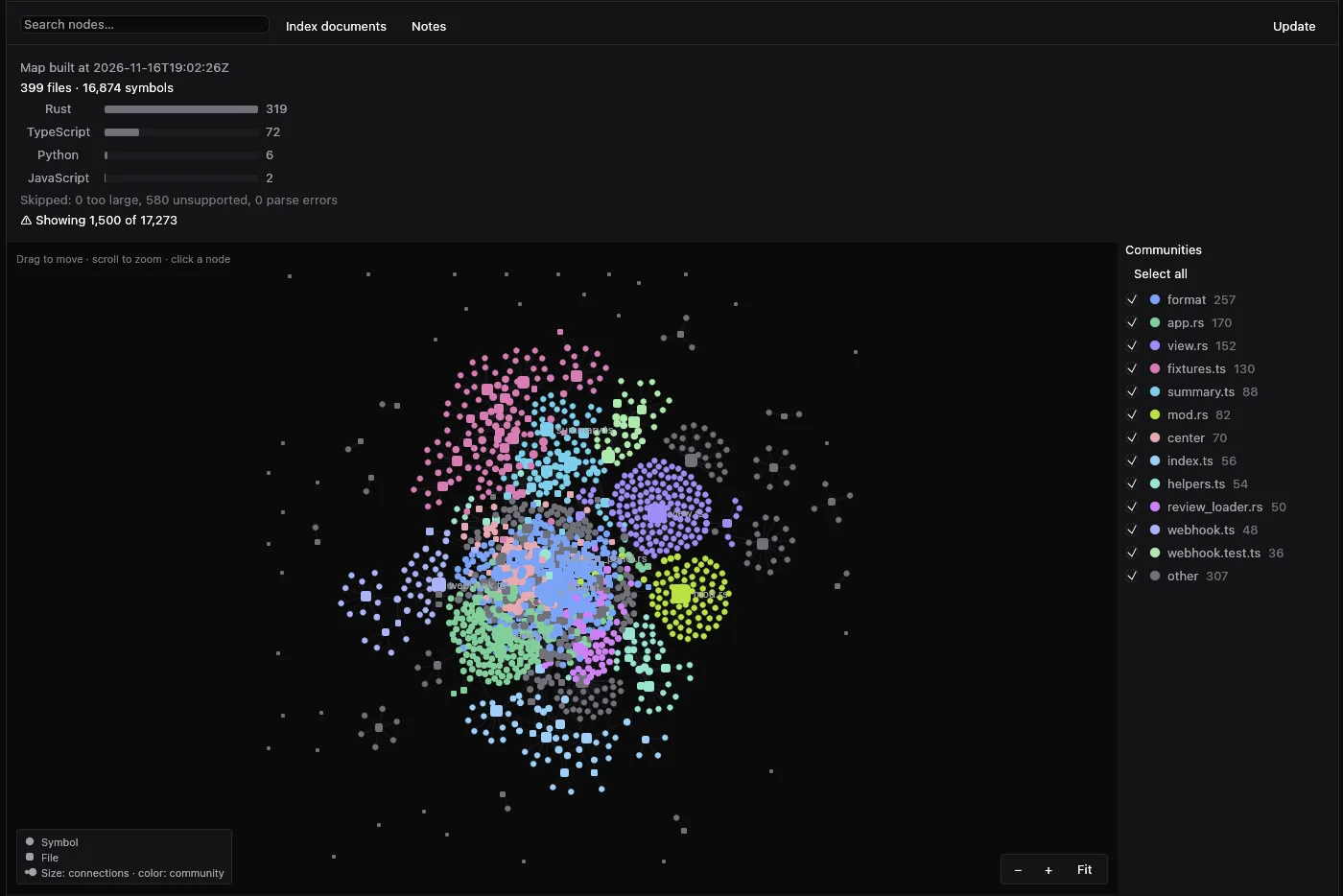
The Knowledge Base view draws the map of a project: its files, its documents, its symbols, and the concepts in them.
- A rounded square is a file or a document. A circle is a symbol. A diamond is a concept.
- A dashed outline marks a concept that no file confirms yet.
- The colors are communities: groups of code that work together. The graph shows up to 1,500 nodes.
- Search the nodes, filter by community, and click a node to see its detail.
- «Index documents» adds your Markdown documents to the map. «Notes» and «Memory» keep what the agents learn.
- An agent reads the same map with solidle kb query.
07 · The cloud
Send a session to the cloud. Close your Mac.
A right-click on a Claude Code session shows «Send to cloud…». The session continues on your host over ssh. «Bring back to Mac…» returns it.
- Your host needs ssh, tmux, git, tar, and Claude Code. You log in to Claude Code on the host once.
- Uncommitted changes travel with the session. Git-ignored files do not.
- The return applies only when it is a fast-forward, so nothing on your Mac is overwritten.
- While a session is in the cloud, its local terminal, fork, and delete are off.
- No host? Settings → Cloud → Fly.io creates a machine in your own Fly.io account. It stops after 15 minutes with no agent at work. Fly.io charges you: about US$29 a month if it stays on 24 hours.
- Cloud sessions are macOS only.
08 · Settings
Ten sections. Each one does one job.
Everything is set inside solidle. You never edit a config file.
General
Language, the mode, the knowledge base, the model debate, the writing rule, and anonymous usage.
Agents
The agents that solidle finds, and the agent CLIs that you add.
Providers
OpenRouter, Amazon Bedrock, or Google Vertex AI.
Plugins
Review and approve Claude Code plugins.
Cloud
Your ssh hosts, and a Fly.io machine. macOS only.
Terminal
The terminal of each session.
Files
The file explorer and the document viewer.
Notifications
An alert when a session needs you.
Voice
Dictation and replies read aloud. macOS only.
Notch
Rayo, the sessions in the notch. macOS 15 or later.
The Windows build has seven sections: Cloud, Voice, and Notch are not in it.
09 · The Office
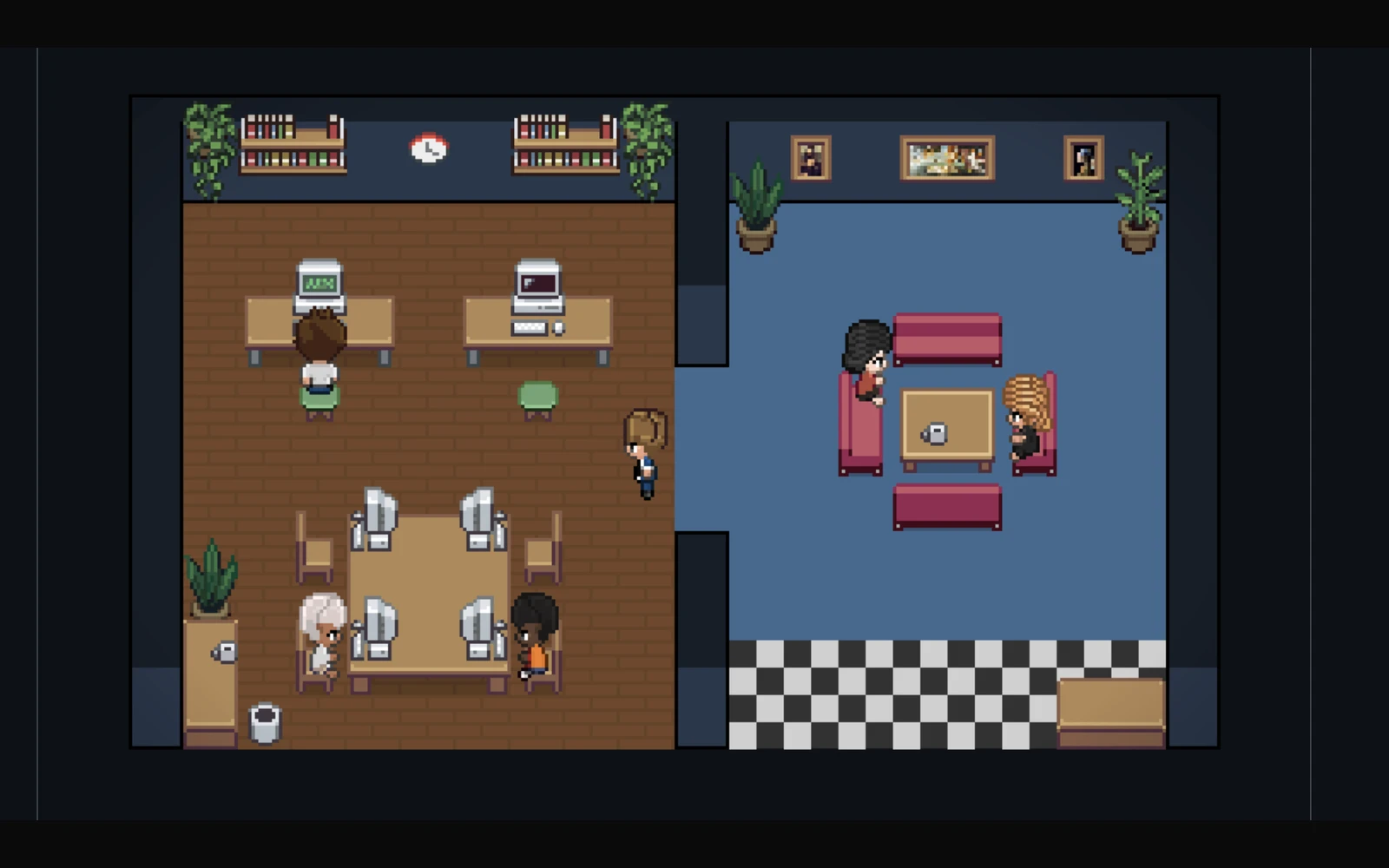
The Office: see your assistants as a team.
One room for each project. One desk for each assistant.
- An assistant that works types at its desk.
- An assistant that needs you raises an arm.
- An assistant that finished walks to the lounge.
- A click on a desk opens that session.
- Four worlds: Office, Orbital, City, and Battle.
10 · Compare
With solidle and without it
| Without solidle | solidle | |
|---|---|---|
| Find an assistant | Search through tabs and windows | Every assistant in one list, by project |
| Close the window | The work stops, unless you set up more tools | The work continues |
| Check the state | Open each window and look | A sun mark on every session, and on the Dock icon |
| Review the changes | Run commands in each folder | One Review window for every session |
| Answer an assistant | You find out when you look at its window | A macOS notification for Claude Code sessions |
| Change the assistant | Start again and explain the task again | The conversation goes with the task |
11 · Get started
Is solidle for you?
It is for you if…
- You use an AI coding assistant on a Mac.
- You give tasks to more than one assistant at the same time.
- You want to review the work before you accept it.
What you need
- A Mac with macOS 13 or later.
- At least one assistant installed: Claude Code, Codex, Cursor, Gemini, OpenCode, Grok, or Antigravity.
- git. It is the tool that records the changes in your code.
solidle does not include an assistant.
Install in three steps
- Open the downloaded .dmg file.
- Drag solidle to the Applications folder.
- Open solidle from the Applications folder.
solidle tells you when a new version is available.
12 · For developers
For developers: every feature
The technical detail is here. Open the group you want. All of these are in the version you download today.
Agents and sessions
- Claude Code, Codex, Cursor, Gemini, OpenCode, Grok, or Antigravity as the agent of each session. A session can also be a plain shell.
- Add an agent CLI that solidle does not know, in Settings → Agents.
- Pick the model of each session. Claude Code, Codex, and Antigravity also take a reasoning effort: low, medium, high, xhigh, or max.
- Optional git worktree per session. A folder without git also works, without a worktree.
- Sessions keep running when you close the window, and you can resume them later from the agent transcript.
- «Resume conversation…» in a project lists the earlier Claude Code conversations of that project, in all its worktrees.
- Switch the agent of a session. solidle hands the text of the conversation to the new agent only from Claude Code or Codex.
- Fork a Claude Code, Codex, or Grok session into a new session.
- Optional auto mode per session. It is off by default.
- «Start debate…» sends a session plan, a question, a plan that the agent writes, or a plan-mode plan to 1 to 3 reviewer agents.
- Auto-respond answers the routine prompts of Claude Code and Codex in a local session with a worktree. A fixed danger check sends risky or unclear actions to you, with a «Dangerous action, you decide» alert. It is off by default.
- Automatic session titles, read from the title that the agent writes. You can pin, rename, and hide sessions.
See everything
- Projects in a sidebar, each with its icon, its color, and its sessions. You can hide a project; its sessions keep running.
- Grid: all open terminals at once, with a filter by project.
- Office: a top-down pixel office with one room per project and a shared lounge. It has four worlds: Office, Orbital, City, and Battle.
- An alert when a Claude Code session waits for your permission or asks you a question, and when Grok asks for permission. It goes to the notch or to macOS notifications.
- Rayo: the sessions that need you, in the notch of your Mac. It needs macOS 15 or later, and it is on by default.
- «stuck?» on a Claude Code session that repeats the same tool 3 times, or that changes no file for 10 minutes.
- «Waits for your review» when an agent finished and left changes.
- A right panel with 14 blocks: status, environment, context, connectors, changes, knowledge, plan progress, activity, Git, GitHub PR and CI, subagents, MCP servers, skills, and commands.
- A strip at the bottom of the window with the plan quota of Claude and of Codex.
- The right panel has three tabs: Panel, Files, and Trajectory. Trajectory lists the steps of the agent.
- «Changes per turn» shows the diff of each turn of a local session, with up to 50 checkpoints.
- ⌘K opens the command palette: commands, shortcuts, sessions, and project scripts.
- Computer control lets an agent use an isolated Chrome, your Chrome, the iOS Simulator, the Android emulator, or the macOS desktop. It is off in each new session, and it is not in the Windows build.
Knowledge base
- A map of the files and the symbols of each project, for the agents and for you. It is on by default. Turn it off in Settings → General.
- The map covers .rs, .ts, .tsx, .js, .jsx, .mjs, .cjs, and .py files up to 1 MiB.
- An agent asks the map with solidle kb summary and solidle kb query <name>.
- The Knowledge Base view draws files, documents, symbols, and concepts as a graph of at most 1,500 nodes, colored by community.
- «Index documents» adds your Markdown documents. «Notes» keeps notes for the agents, and «Memory» lists what they remember. You approve or reject a fact before it becomes global.
- More commands for the agents: solidle kb map, solidle kb docs, solidle kb history, and solidle kb remember.
- The «Impact» block of the diff viewer lists the symbols that the diff touches.
- Nothing leaves your computer. The map makes no network call and no model call.
Review and merge
- Diff viewer: the changes of a session against its base branch, file by file.
- Review window: the commits and the uncommitted changes of each session. Merge a session into the checkout branch of the project.
- Comment on a line of the diff, and «Send to the agent» pastes the comment into the session. You press Enter.
- «Create PR…» in the Review window opens a GitHub pull request with gh pr create.
Cloud sessions
- Send a Claude Code session to your own host over ssh. Bring it back to your Mac later.
- Fly.io: Settings → Cloud → Fly.io creates a machine in your own Fly.io account, in the region you choose. Fly.io charges you for the machine.
- The Fly.io machine stops after 15 minutes with no agent at work and no open ssh connection.
- Uncommitted changes travel with the session. Git-ignored files do not.
- solidle copies no credentials. You log in to Claude Code on the host once.
- Only a Claude Code session goes to the cloud. «Bring back to Mac…» applies the work only as a fast-forward.
- Cloud sessions are not in the Windows build.
Automation and extensions
- Scheduled tasks: run a prompt on a project once, daily, weekly, or monthly. Each run opens a new session. A task does not run while the app is closed.
- Project scripts: setup, teardown, and run in .solidle/config.json. You approve them before they run.
- Plugins in the Claude Code format, from your folder or from the .solidle/plugins folder of a repository. You review each plugin, and «Approve what I reviewed» fixes its SHA-256. A plugin that contains a git repository is refused.
- Providers: run Claude Code, Codex, or OpenCode through OpenRouter, Amazon Bedrock, or Google Vertex AI.
- Writing rule: Settings → General asks the agents for clean comments. It is on by default.
Share and reuse
- Shared sessions: share a session as one .solidle file, after you review its turns. The code is optional and off by default. The raw transcript does not travel. The file is not encrypted.
- Share by link: «Create link» encrypts the same package on your Mac and uploads it to share.solidle.dev. The key is only in the link, after #. A link lasts 7 days, and a package can have at most 2 GB.
- «My links» lists your links and deletes them. File → «Import from Link…» opens a link. Anyone with the full link can read the package.
- Sharing is not in the Windows build.
- Prompt library: save prompts, edit them, export and import them, and insert one into the open session.
Voice
- Optional, and off by default. While it is off, solidle requests no permission and sends nothing.
- Dictate a prompt. Dictation stays on your Mac, and needs macOS 14 or later.
- Listen to the reply of the agent. «Who reads» selects the voice of your Mac, with no account and no network, or ElevenLabs with your own API key. solidle keeps the key in the macOS Keychain.
- Full mode reads the whole reply, and is the default. Summary mode reads a summary. Summary mode sends the reply to Anthropic or OpenAI through your own agent CLI.
- Voice is not in the Windows build.
Files and terminal
- Embedded terminal for each session, with copy and paste.
- A new shell in the folder of the session, inside solidle.
- File explorer with Git marks and a filter. Create, rename, duplicate, and move files to the Trash, with undo.
- Drag files from the explorer to Finder, and drop files from Finder into solidle.
- Document viewer next to the terminal: Markdown files up to 512 KiB, and PNG, JPG, GIF, WebP, and SVG images up to 20 MiB.
- The viewer also opens Word, Excel, PowerPoint, OpenDocument, PDF, EPUB, RTF, and CSV files up to 20 MB. solidle converts them on your computer.
- Mermaid diagrams in a Markdown file are drawn in the viewer.
- On macOS, ⌘-click a file path that the agent printed in the terminal to open that document.
- Text editor next to the terminal: UTF-8 files up to 1 MiB, with syntax colors up to 256 KiB. Save with ⌘S. solidle tells you when the file changed on disk.
Usage and the app
- Usage window: tokens and cost for each week, by project and by model, with the activity by hour.
- The context breakdown of each Claude Code session, in the right panel.
- Native macOS app, written in Rust. The interface is in English or Spanish.
- Updates from inside the app. solidle verifies the SHA-256, the ed25519 signature, and the Apple Developer ID signature before it installs.
- Backups of the app state, with «Restore from Backup…» in the menu.
- Help → «Send Feedback…» sends a bug or an idea. Nothing leaves before you press «Send».
- On macOS, Help → «Clean Build Files…» removes the Cargo target folders of your projects.
Keyboard shortcuts
| ⌘N | New session |
|---|---|
| ⌘1 … ⌘9 | Open the session at that position |
| ⌘⌥↑ ⌘⌥↓ | Previous or next session |
| ⌘K | Command palette |
| ⌘G | Grid of all open terminals |
| ⌘D | Diff viewer of the session |
| ⌘⇧D | Review window |
| ⌘⇧U | Usage window |
| ⌘⇧T | New shell in the folder of the session |
| ⌘⇧M | Dictate a prompt, with voice turned on |
| ⌘⇧L | Read the last reply aloud, with voice turned on |
| ⌘⇧O | Close or reopen the document |
| ⌘B | Hide or show the sidebar |
| ⌘I | Hide or show the right panel |
13 · Questions
Questions
What is solidle?
solidle is a Mac app that runs your AI coding assistants in one window. Each assistant works in a session, and solidle shows the state of each session.
Is solidle an AI?
No. solidle does not write code. Your assistants stay the same programs you already use. solidle runs them and keeps them in one list.
Is solidle free?
Yes. The download is free, and solidle has the MIT License. The assistants are separate products.
Which assistants does solidle support?
Claude Code, Codex, Cursor, Gemini, OpenCode, Grok, and Antigravity. You can also add an agent CLI in Settings → Agents. The «needs you» state comes from Claude Code, and from Grok when it asks for permission. Codex, OpenCode, and Antigravity report working and finished.
What happens when I close the window?
The sessions keep running. You can resume them later.
How do I review what an assistant changed?
Press ⌘D to see the changes of one session. Press ⌘⇧D to open the Review window, which shows every session and merges the one you choose.
Does solidle send usage data?
Yes, one anonymous report per day, on by default. You turn it off in Settings. The report has a random ID, the app and macOS versions, and counts of sessions, features and tokens per model. It has no prompts, no project names, no paths and no email.
What do I need to run solidle?
macOS 13 or later, git, and at least one assistant installed. Voice needs macOS 14 or later.
Does solidle run on Windows?
Yes, on Windows 10 and 11 x64 with WSL2. Cloud sessions, sharing, voice, the notch, computer control, and system notifications are not in the Windows build. The Windows build is not signed, so SmartScreen shows a warning.
14 · Glossary
Words on this page
Six words, each in one sentence.
- agent
- The technical name of an AI coding assistant.
- session
- One assistant that works on one task.
- project
- The folder that holds your code.
- terminal
- The text window where an assistant runs.
- merge
- To add the changes of an assistant to your project.
- worktree
- A separate copy of your code for one assistant.
15 · Roadmap
What comes next
Nothing in this section is available yet.
planned · not started
Software Factory
Coordinate multiple agents to build products from start to finish.
planned · not started
Assisted learning
Help people who vibe code truly understand what they are building.
planned · not started
Tutors and specialized agents
Stay with you during development, explain decisions, and help you improve your code.
Get solidle
Download solidle
One window. One sun for each assistant. You decide what stays.
Download for macOSOne file for Apple silicon and Intel. macOS 13 or later. MIT License.
Or install from the terminal:
curl -fsSL https://solidle.dev/install.sh | shThe script downloads the latest version and verifies the SHA-256 and the Apple Developer ID signature. It puts solidle in /Applications and does not ask for a password.
By downloading solidle, you accept the Terms. The Privacy page tells you what data solidle sends.
Not on a Mac?
Download for WindowsWindows 10/11 x64 with WSL2. On first start a setup screen installs WSL, Ubuntu, tmux, git and Claude Code with one button each. The Windows build is not signed, so SmartScreen shows a warning.